
A comparable emergency stop device quotation starts with function, operator, contacts. Record the required result, site interfaces and acceptance evidence in one revision-controlled RFQ. IndustryApex engineers use these inputs to define the equipment, integration and OEM/ODM scope for your project.
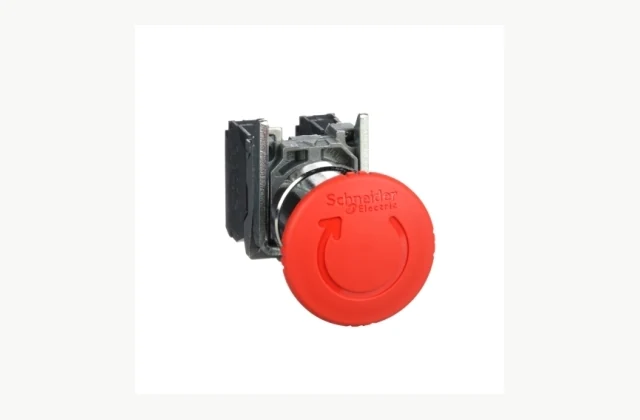
Shown as a configuration reference. Availability and the equipment offered for your project are confirmed separately.
This emergency stop device RFQ checklist is a working procurement document. Use it to turn the requirements in the Emergency stop device equipment guide into a written project brief and a comparable equipment offer.
What should a quotation for emergency stop device include?
Complete the product-specific requirements below. Keep buyer requirements, the proposed equipment response and unresolved points in separate columns. Attach the relevant drawings, samples or site records to the same RFQ revision.
| Requirement to define | How to make the response comparable |
|---|---|
| Function Machine, risk-assessment requirements and responsible engineer. |
Record the actual requirement, its supporting document and any unresolved point. Request a written response against the same requirement revision. |
| Operator Actuator, latching, release action and accessible position. |
Record the actual requirement, its supporting document and any unresolved point. Request a written response against the same requirement revision. |
| Contacts Exact blocks, behavior, terminals and design evidence. |
Record the actual requirement, its supporting document and any unresolved point. Request a written response against the same requirement revision. |
| Installation Panel dimensions, seals, environment and accessories. |
Supply a representative example and its difficult variation. Identify the drawing, sample, photograph or production record used for the proposal. |
| System behavior Monitoring, reset and restart requirements. |
Record the actual requirement, its supporting document and any unresolved point. Request a written response against the same requirement revision. |
| Validation Completed-function records and exact replacement identity. |
Record the actual requirement, its supporting document and any unresolved point. Request a written response against the same requirement revision. |
| Destination, site conditions and delivery access | Provide the actual site information and connection boundary. Identify what IndustryApex supplies and what the installation site must prepare. |
| Installation boundary, utilities and connection drawings | Attach the current revision and mark requested changes. Ask for the approved scope, engineering responsibility and change-control record. |
| Acceptance procedure, documentation and training scope | Agree the sample or case, measurement method, record and decision owner. Ask which evidence is included in the quotation. |
| OEM/ODM changes interface, material, branding or new design; written engineering feasibility required |
Attach the current revision and mark requested changes. Ask for the approved scope, engineering responsibility and change-control record. |
How to compare emergency stop device quotations
Return the same completed checklist to our engineering team when reviewing a revised offer. For each requirement, record the proposed configuration, included evidence, price boundary and open question. A blank response is an unresolved item; request clarification before treating two offers as equivalent.
- Function: identify the requirement revision, the proposed response and the document that supports it.
- Operator: identify the requirement revision, the proposed response and the document that supports it.
- Contacts: identify the requirement revision, the proposed response and the document that supports it.
Request separate scope lines for the main equipment, application-specific tooling or accessories, site connections, integration work, commissioning, training and support, where applicable. Record delivery terms, quotation validity and exclusions beside the quoted price. Keep optional items separate from items required for the stated result.
Emergency stop device acceptance criteria: what must be agreed?
Use the following equipment requirements to frame the acceptance discussion:
- Acceptance procedure, documentation and training scope
Have the responsible engineering personnel agree the test case and method for the exact offered equipment. Record the input or sample identification, supplied configuration, observations or measurements, agreed decision criteria, open deviations and sign-off responsibility. Separate evidence available at the factory from checks that depend on the installed site. Retain the accepted records with the equipment and document later requirement changes.
OEM/ODM emergency stop device: define the change boundary
- OEM/ODM changes: interface, material, branding or new design; written engineering feasibility required
Distinguish approved standard options, branding and documentation from mechanical, electrical, control or process development. Send the intended application, current drawings, target market, quantities and requested changes. IndustryApex engineers review feasibility and define the proposed supply and engineering scope. Agree design ownership where relevant, the validation responsibility and the evidence that will accept the changed configuration. A reference photograph does not define the offered configuration or grant rights to relabel the pictured brand.
Build your emergency stop device project brief
Use the worksheet to record your inputs and open questions. You can download the brief or carry it into the project request. It is sent to IndustryApex only when you complete and submit that request form.
Complete your product-specific RFQ worksheet
You can edit the final requirements on the request form. No inquiry is submitted from this worksheet.
Use this brief in my project request ↗Discuss the equipment scope with our engineers
Send the completed brief with the required result, destination and purchase timing. Our engineers can review the equipment configuration, application interfaces and requested customization, then identify the information still needed for a confirmed quotation.
Request a emergency stop device quotation ↗ · Discuss OEM requirements · Discuss ODM engineering
Related equipment scope: Electronic temperature controller · IO-Link master · Industrial Ethernet media converter.
Define your equipment requirements
Review the Emergency stop device buying guide for the complete equipment scope.
Discuss this equipment project ↗ · OEM requirements · ODM requirements. Configuration and feasibility are reviewed for your application.
Explore the Emergency stop device buying guide and RFQ checklist ↗
Frequently asked questions
What belongs in an RFQ for emergency stop device?
Start with function, operator, contacts. Complete the remaining product-specific requirements in the worksheet, and attach the relevant drawings, sample information and site records. State the destination, required result and purchase timing so our engineers can review a defined project.
How do I compare emergency stop device quotations on the same basis?
Use the same requirement revision for each comparison. Record the proposed configuration, included evidence, required accessories or integration, commissioning responsibilities, delivery terms and exclusions. Request a written response to unresolved requirements rather than comparing the main equipment price alone.
What belongs in the emergency stop device acceptance record?
Identify the approved input or sample, exact configuration, agreed method, observations or measurements, decision criteria, deviations and responsible sign-off. Agree with the responsible engineering personnel what can be checked at the factory and what depends on the installed site.
Can IndustryApex review OEM/ODM emergency stop device requirements?
Yes. Send the application, requested changes, drawings, target market, quantities and acceptance requirements. IndustryApex engineers review the proposed equipment and engineering scope. Feasibility, validation work, commercial terms and delivery are confirmed for the agreed project; the reference photograph does not establish branding rights.
Reference information
- Schneider Electric Harmony XB4BS8445 official product reference
- Schneider Electric Harmony XB4BS8445 official technical or family reference
Reference data and images explain equipment configurations. IndustryApex engineers confirm the offered model, specification and commercial scope in your project quotation.