
Choose a signal tower light from the machine states operators must recognize, viewing conditions and control interface. Define colors, patterns, mounting and any audible indication, then verify that the installed signals remain understandable across the intended work area. Trigger every machine state and priority combination from the host controller, checking the installed display from the intended viewpoints. Verify alarm acknowledgement, communication loss and restart indications. Record the final mapping and mounting location; a bench illumination test does not establish useful factory visibility. Submit the intended configuration and any OEM/ODM changes for project-specific feasibility review.
Choose a signal tower light from the machine states operators must recognize, viewing conditions and control interface. Define colors, patterns, mounting and any audible indication, then verify that the installed signals remain understandable across the intended work area.
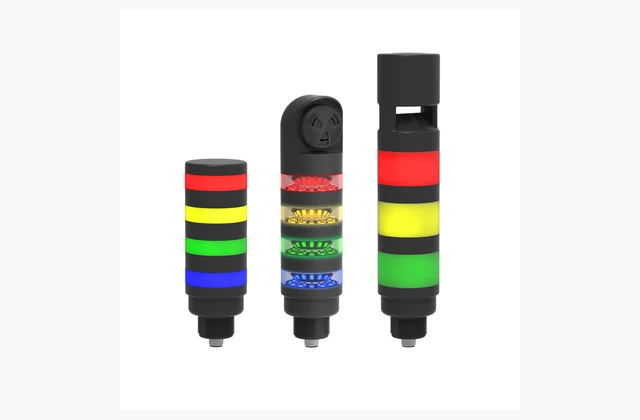
Shown as a configuration reference. Availability and the equipment offered for your project are confirmed separately.
Map machine states to signals
List normal, waiting, warning, fault and intervention states with the intended operator action. Agree consistent meanings within the factory rather than selecting colors for appearance alone. If several states can occur together, define priority so the displayed signal does not conceal a more important condition.
Check visibility in the actual space
Provide viewing distance, obstructions, ambient light and required viewing directions. A tower mounted behind a machine frame may be invisible from the aisle. Evaluate the actual colors and flashing patterns in place, including workers who may need additional text or audible information.
Match electrical or network control
Specify voltage, discrete input behavior or the supported communication protocol. Confirm wiring, connector pinout and whether segments are fixed or programmable. A network-ready family may include multiple variants, so the exact delivered controller and configuration tools must match the machine's available interface.
Define audible indication selectively
State when an audible alarm is needed, the surrounding noise and how acknowledgement works. Avoid making every routine status equally urgent. Sound-level suitability and alarm policy need site assessment; the tower's optional buzzer should be itemized rather than assumed to be present from a photograph.
Plan mounting and environmental protection
Specify bracket height, pole or direct mounting, vibration and cleaning exposure. Confirm cable entry and the protection rating of the complete assembly, including connectors and unused openings. A protected light module does not guarantee that an improvised mounting or cable joint has the same environmental performance.
Keep configuration and spare modules clear
Record segment order, colors, patterns and any firmware or saved program. Identify replacement modules and compatibility with the supplied base. A service change that alters the color sequence or network mapping can confuse operators even if every lamp still illuminates correctly.
Compare a complete signal tower light scope
| Decision | Information to compare |
|---|---|
| Map machine states to signals | State list, color/pattern meanings, priorities and operator actions |
| Check visibility in the actual space | Viewing distances, ambient lighting, sight lines and accessibility needs |
| Match electrical or network control | Supply, discrete/network command, pinout and programming tools |
| Define audible indication selectively | Audible option, noise environment, alarm priorities and acknowledgement |
| Plan mounting and environmental protection | Mounting, vibration, cleaning, cable entry and complete-assembly protection |
| Keep configuration and spare modules clear | Segment order, pattern backup, base compatibility and spare-module identification |
Plan installation and access
Mount the tower securely at the approved visible location with protected cabling and suitable strain relief. Match grounding and power protection to the electrical design. Keep access for cleaning and module replacement without requiring unsafe climbing or reaching across an operating machine.
Agree acceptance evidence before ordering
Trigger every machine state and priority combination from the host controller, checking the installed display from the intended viewpoints. Verify alarm acknowledgement, communication loss and restart indications. Record the final mapping and mounting location; a bench illumination test does not establish useful factory visibility.
Define OEM/ODM engineering boundaries
OEM colors, patterns, labels and approved mounts can be reviewed. ODM optics, electronics or audible-function changes require environmental and interface verification. A standard status light must not be represented as a validated safety protective device, and reference imagery establishes neither stock nor a manufacturer's agency relationship.
What should your signal tower light RFQ include?
- State list, color/pattern meanings, priorities and operator actions
- Viewing distances, ambient lighting, sight lines and accessibility needs
- Supply, discrete/network command, pinout and programming tools
- Audible option, noise environment, alarm priorities and acknowledgement
- Mounting, vibration, cleaning, cable entry and complete-assembly protection
- Segment order, pattern backup, base compatibility and spare-module identification
- Destination, working environment, access and delivery constraints
- Installation responsibility, utilities and connection drawings
- Acceptance samples, documented test method, operator training and maintenance scope
- OEM/ODM changes requested: identification, tooling, interfaces or new design; engineering feasibility to be confirmed
Need OEM / ODM customization?
Submit branding, packaging, configuration or engineering requirements for this equipment. Include the target market, initial and annual quantities, required changes and acceptance criteria.
Customization feasibility, permitted branding, development responsibilities, minimum quantity, cost and lead time are reviewed for the proposed supplier and configuration before a quotation is confirmed.
Frequently asked questions
How do I map machine states to signals?
List normal, waiting, warning, fault and intervention states with the intended operator action. Agree consistent meanings within the factory rather than selecting colors for appearance alone. If several states can occur together, define priority so the displayed signal does not conceal a more important condition.
How do I check visibility in the actual space?
Provide viewing distance, obstructions, ambient light and required viewing directions. A tower mounted behind a machine frame may be invisible from the aisle. Evaluate the actual colors and flashing patterns in place, including workers who may need additional text or audible information.
How do I match electrical or network control?
Specify voltage, discrete input behavior or the supported communication protocol. Confirm wiring, connector pinout and whether segments are fixed or programmable. A network-ready family may include multiple variants, so the exact delivered controller and configuration tools must match the machine's available interface.
How do I define audible indication selectively?
State when an audible alarm is needed, the surrounding noise and how acknowledgement works. Avoid making every routine status equally urgent. Sound-level suitability and alarm policy need site assessment; the tower's optional buzzer should be itemized rather than assumed to be present from a photograph.
How do I plan mounting and environmental protection?
Specify bracket height, pole or direct mounting, vibration and cleaning exposure. Confirm cable entry and the protection rating of the complete assembly, including connectors and unused openings. A protected light module does not guarantee that an improvised mounting or cable joint has the same environmental performance.
How do I keep configuration and spare modules clear?
Record segment order, colors, patterns and any firmware or saved program. Identify replacement modules and compatibility with the supplied base. A service change that alters the color sequence or network mapping can confuse operators even if every lamp still illuminates correctly.
Reference information
- Banner Engineering TL50 official product reference
- Banner Engineering signal tower light official family or technical reference
Reference data and images explain equipment configurations. IndustryApex engineers confirm the offered model, specification and commercial scope in your project quotation.