
Combine an operator display and computing platform with a panel PC selected for software, mounting and the actual machine environment. Compare touch operation, connections, power and recovery requirements so the delivered interface remains usable and maintainable throughout the equipment lifecycle. Prioritize architecture, display, mounting. Use the checkpoints to build a consistent equipment scope and confirm the intended trial or installation evidence. The official image is a product reference; it does not establish availability or an authorized supplier relationship. Submit OEM/ODM changes for application-specific feasibility review.
Combine an operator display and computing platform with a panel PC selected for software, mounting and the actual machine environment. Compare touch operation, connections, power and recovery requirements so the delivered interface remains usable and maintainable throughout the equipment lifecycle.
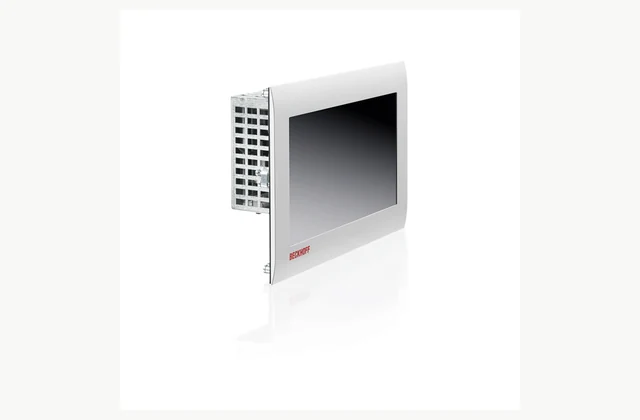
Shown as a configuration reference. Availability and the equipment offered for your project are confirmed separately.
Distinguish a panel PC from a display
A panel PC includes computing capability as well as a display, whereas a remote display or operator terminal can use a different architecture. Identify where the application will run and whether local control, visualization or another task is intended. Check the operating system and supported runtime. A familiar screen size or connector does not establish that existing application software can move to the proposed platform without changes or additional licenses.
Match software and computing resources
List the application version, processor architecture, drivers and required interfaces. Specify memory, storage and performance through the actual workload rather than choosing solely from a CPU label. Where machine-control software is used, confirm the supported configuration with its responsible supplier. The Beckhoff CP6700/CP6706 reference illustrates a built-in panel PC family; exact hardware and software variants must be distinguished in the quotation and validated for the intended application.
Choose the display and touch interface
Screen size, resolution, viewing position and touch technology affect operator use. Describe gloves, contamination, lighting and the people who will interact with the machine. Assess the interface with representative screens and tasks, not just a bright product demonstration. Check any required physical buttons or separate emergency controls through the machine’s control design; a touchscreen should not be assumed to replace functions requiring a distinct protective arrangement.
| Selection issue | Information to specify |
|---|---|
| Architecture | Application location, operating system, runtime and licensing. |
| Display | Size, resolution, touch, gloves and viewing conditions. |
| Mounting | Cut-out, panel thickness and rear clearance. |
| Environment | Installed front protection, cabinet heat and cleaning exposure. |
| Interfaces | Power, ports, peripherals and cable access. |
| Recovery | Approved image, configuration and replacement dependencies. |
Engineer the panel mounting and environment
Provide the cut-out, panel thickness, mounting position and available rear clearance. A front-face protection rating can have conditions tied to installation and does not automatically describe the back of the unit or the complete cabinet. Discuss dust, moisture, cleaning and temperature at the actual location. Check cooling and heat dissipation within the enclosure and keep connectors accessible. A sealed-looking front is insufficient evidence for every washdown or outdoor application.
Define power, connections and peripheral scope
List Ethernet, USB, serial and other connections and the required electrical or protocol behavior. Identify keyboard, storage or service access where relevant. Match the power range and shutdown requirements to the cabinet design. Cable length and routing can affect mounting and maintenance. Compare included connectors and accessories so a panel-PC price is not mistaken for the complete cabinet interface with every peripheral needed for commissioning or operation.
Plan image recovery and replacement
Retain the installed image, application configuration, licenses and a documented restoration method. Check how replacement hardware affects activation and software compatibility. Decide who manages operating-system updates and tests application behavior after changes. Acceptance should include normal operation, the agreed restart behavior and restoration using the retained records. A working screen at handover is not enough if a future storage failure leaves the machine dependent on an unavailable undocumented installation.
Set OEM/ODM around the machine interface
Front labeling, mounting organization, preloaded software and selected interface arrangements can be reviewed. Changes to enclosure, touch design, electronics or software support require engineering and lifecycle commitments. Provide the machine environment and cut-out drawings with the brief. Private labeling should preserve hardware identity and recovery information. A customized panel needs evidence for its own installed configuration rather than inheriting front-protection or application claims from a reference photograph.
What should your industrial panel pc RFQ include?
- Architecture: Application location, operating system, runtime and licensing.
- Display: Size, resolution, touch, gloves and viewing conditions.
- Mounting: Cut-out, panel thickness and rear clearance.
- Environment: Installed front protection, cabinet heat and cleaning exposure.
- Interfaces: Power, ports, peripherals and cable access.
- Recovery: Approved image, configuration and replacement dependencies.
- Destination, site conditions and delivery access
- Installation boundary, utilities and connection drawings
- Acceptance procedure, documentation and training scope
- OEM/ODM changes: interface, material, branding or new design; written engineering feasibility required
Need OEM / ODM customization?
Submit branding, packaging, configuration or engineering requirements for this equipment. Include the target market, initial and annual quantities, required changes and acceptance criteria.
Customization feasibility, permitted branding, development responsibilities, minimum quantity, cost and lead time are reviewed for the proposed supplier and configuration before a quotation is confirmed.
Frequently asked questions
Is a panel PC the same as an industrial touch display?
No. A panel PC includes a computer that can run software; a display may depend on a separate host. Define the intended architecture and application location before procurement. Similar screen dimensions and touch behavior do not establish that the products can be substituted without system changes.
Which software details must be checked?
Identify operating system, architecture, application and runtime versions, drivers and licenses. Confirm the supported hardware configuration with the responsible software supplier. A capable processor and sufficient storage do not alone prove compatibility with an existing visualization or machine-control installation.
Does a protected front make the whole panel PC waterproof?
Not automatically. The rating can apply to the installed front under specified mounting conditions, while the rear has different requirements. Review the cut-out, seals, cabinet and cleaning environment. Obtain evidence for the complete intended arrangement rather than inferring suitability from the front’s appearance.
How should touch operation be evaluated?
Use representative application screens, operator tasks, gloves and environmental conditions. Check readability and interaction from the mounting position. Touch technology should fit the actual workflow, and any separate protective controls must follow the machine design rather than be replaced by an assumed touchscreen function.
Why is a recovery image part of the purchase scope?
It helps restore the operating system, application and settings after storage or hardware replacement. Confirm license and compatibility dependencies and test the documented recovery method. Without these records, a functioning panel at handover may still be difficult to maintain through a later failure.
Can a panel PC be customized for an OEM machine?
Labels, mounting, software loading and selected interfaces can be reviewed. Enclosure, electronics or touch changes require technical assessment and a support plan. Submit environment and panel drawings and retain hardware identity and recovery information so customization remains maintainable in the final machine.
Reference information
- CP6700, CP6706 | Economy built-in Panel PC | Beckhoff United Kingdom
- Product overview
Reference data and images explain equipment configurations. IndustryApex engineers confirm the offered model, specification and commercial scope in your project quotation.