
Process field data close to industrial equipment using an edge computer matched to software, device interfaces and lifecycle needs. Compare the complete operating environment and deployment method, including storage, updates and service, rather than selecting by processor name alone. Prioritize software, interfaces, workload. Use the checkpoints to build a consistent equipment scope and confirm the intended trial or installation evidence. The official image is a product reference; it does not establish availability or an authorized supplier relationship. Submit OEM/ODM changes for application-specific feasibility review.
Process field data close to industrial equipment using an edge computer matched to software, device interfaces and lifecycle needs. Compare the complete operating environment and deployment method, including storage, updates and service, rather than selecting by processor name alone.
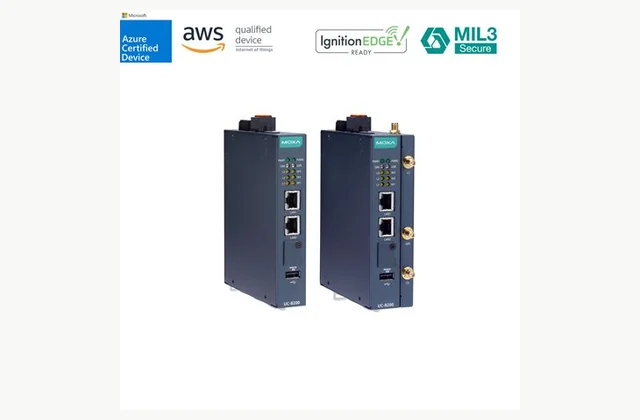
Shown as a configuration reference. Availability and the equipment offered for your project are confirmed separately.
Begin with the application software
An edge computer runs an application near field equipment, but the required hardware depends on that application’s software stack. List the operating system, runtime, libraries and any vendor packages. Check processor architecture and supported versions before comparing performance. The Moxa UC-8200 reference is an Arm-based computing platform; software compiled for a different architecture should not be assumed portable. Clarify who owns application installation, testing and ongoing maintenance.
Create a physical interface schedule
List Ethernet, serial, CAN, USB and any other connections required by the actual project. State protocol and electrical requirements separately because a connector does not establish application compatibility. Identify isolation, adapters and cable needs. Cellular or Wi-Fi may require a particular model, module, antenna and destination assessment. Check that the exact configuration can use the required interfaces together without depending on undocumented expansion hardware.
Size processing, storage and recording
Describe data rates, transformations, local analytics and the amount of information retained during a network interruption. Processor type alone cannot establish performance of the deployed application. Ask for a representative workload test, including startup and recovery. Storage selection should consider capacity, expected writes, power-loss behavior and replacement. Local buffering must be designed in the software and storage arrangement; it is not a result of simply calling the device an edge computer.
| Selection issue | Information to specify |
|---|---|
| Software | Operating system, architecture, runtime and application dependencies. |
| Interfaces | Field-device connections, protocols and required adapters or modules. |
| Workload | Processing, data volume, buffering and storage-write requirements. |
| Installation | Power, cabinet temperature, mounting and antenna needs. |
| Lifecycle | Updates, remote access, backup and replacement process. |
| Acceptance | Representative workload, restart and image-restoration evidence. |
Check cabinet environment and power
Record ambient conditions at the mounting point, cabinet ventilation, vibration and contamination exposure. Check the permitted power range and any startup or shutdown behavior needed by the application. A fanless design can help some installations but does not remove heat-dissipation requirements. Allow access to connectors and removable media. Where radio hardware is present, antenna placement and cabinet construction also belong in the deployment plan.
Define a maintainable security lifecycle
Establish supported operating-system versions, security-update policy and the party responsible for deploying patches. Confirm account management, remote access and how secrets or certificates are provisioned. Network controls and application security remain part of the wider design. Plan how configuration and data are backed up and how a failed unit is replaced. A security claim attached to one hardware-software combination should not be transferred to an altered image without review.
Validate deployment and restart behavior
Test the actual application with representative field devices, network conditions and data volumes. Include a controlled restart and the agreed response to lost communications or power, within the application’s approved procedure. Retain the installed image, version list, configuration and restoration method. Check any licensing that depends on hardware identity. Acceptance should leave the maintenance team with a reproducible system rather than a functioning demonstration whose installation steps are unknown.
Specify OEM/ODM as an integration deliverable
Preloaded software, labels, mounting, harnesses and interface organization can be useful customization requests. Changes to hardware, radios, enclosure or operating-system support need separate engineering and lifecycle commitments. Provide the application, expected quantities and destination with the brief. A customized assembly should preserve component identification, update access and a recovery image. The official reference photograph illustrates computing hardware and does not establish an authorized private-label relationship.
What should your industrial edge computer RFQ include?
- Software: Operating system, architecture, runtime and application dependencies.
- Interfaces: Field-device connections, protocols and required adapters or modules.
- Workload: Processing, data volume, buffering and storage-write requirements.
- Installation: Power, cabinet temperature, mounting and antenna needs.
- Lifecycle: Updates, remote access, backup and replacement process.
- Acceptance: Representative workload, restart and image-restoration evidence.
- Destination, site conditions and delivery access
- Installation boundary, utilities and connection drawings
- Acceptance procedure, documentation and training scope
- OEM/ODM changes: interface, material, branding or new design; written engineering feasibility required
Need OEM / ODM customization?
Submit branding, packaging, configuration or engineering requirements for this equipment. Include the target market, initial and annual quantities, required changes and acceptance criteria.
Customization feasibility, permitted branding, development responsibilities, minimum quantity, cost and lead time are reviewed for the proposed supplier and configuration before a quotation is confirmed.
Frequently asked questions
Can an Arm edge computer run every industrial application?
No. The operating system, processor architecture and runtime must support the application. Check compiled components, drivers and vendor packages before hardware selection. A familiar interface or sufficient memory does not establish that software built for another architecture will install and operate correctly.
Does an Ethernet port provide industrial protocol support?
It provides a physical network connection, not automatic application compatibility. Identify the protocols and device drivers required by the project. Confirm whether software is included, developed locally or licensed separately so the edge computer’s hardware interfaces are not confused with a complete communications application.
How should local data buffering be specified?
Define the data volume, outage duration, storage format and the application’s recovery behavior. Check storage write demands and power-loss handling. Buffering requires a suitable software and storage design; a device described as an edge computer should not be assumed to provide it automatically.
What matters for operating-system updates?
Clarify supported versions, update availability and who tests and deploys changes to the application image. Keep a version record and recovery method. The maintenance plan should address software dependencies as well as hardware replacement, especially for unattended installations expected to remain in service.
What should an edge-computer acceptance test prove?
Run the intended application with representative devices and traffic. Check startup, communication interruptions, data retention and restoration using the agreed procedures. Retain the installed image and configuration so the delivered system can be rebuilt instead of relying on undocumented actions performed during a demonstration.
Can edge computers be supplied with customized software?
Preloading and configuration can be reviewed, with clear ownership of software, licenses and updates. Hardware or radio changes need additional assessment. An OEM/ODM scope should include a reproducible image, recovery process and ongoing support responsibilities, not just a branded enclosure with an undocumented application.
Reference information
- UC-8200 Series - Arm-Based Computers | Moxa
- Moxa Industrial Linux - System Software | Moxa
Reference data and images explain equipment configurations. IndustryApex engineers confirm the offered model, specification and commercial scope in your project quotation.