
Select an HMI panel from operator tasks, controller communications and the installation environment. Define screens, alarms, recipes and backup responsibilities with the exact runtime and hardware variant, then prove the complete operator workflow on the intended machine. Run normal operation, recipe changes, alarm acknowledgement and permitted user-role changes against the real controller. Test communication loss, restart, data retention and restoration from the supplied backup. Inspect readability in the installation lighting and retain the final tag list, project version and screenshots with the handover. Submit the intended configuration and any OEM/ODM changes for project-specific feasibility review.
Select an HMI panel from operator tasks, controller communications and the installation environment. Define screens, alarms, recipes and backup responsibilities with the exact runtime and hardware variant, then prove the complete operator workflow on the intended machine.
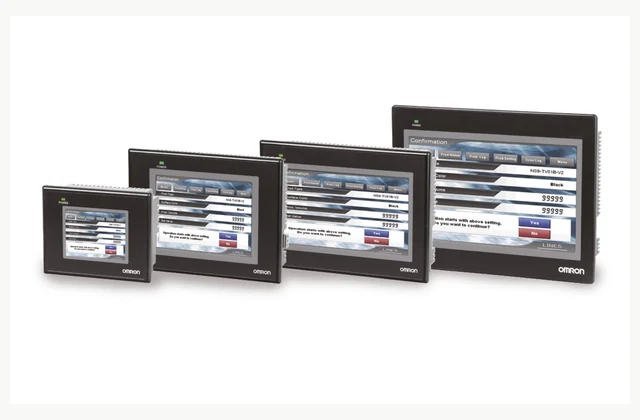
Shown as a configuration reference. Availability and the equipment offered for your project are confirmed separately.
Start with operator decisions
List what operators must see, change and acknowledge during normal production, changeover and faults. Define screen hierarchy and permitted adjustments. A larger display alone does not make a machine usable if alarms lack context or the operator cannot find the relevant operating state.
Verify controller protocol compatibility
Identify PLC model, firmware, available ports and required data types. Confirm the exact HMI driver and its supported commands rather than relying on a shared Ethernet connector. Include communication timing and loss detection, especially where one panel exchanges information with several devices.
Match screen and touch operation
State viewing distance, lighting, language and whether operators use gloves. Check touch response and readability on representative screens. Screen diagonal and resolution need to be considered with the actual controls and alarm text, not interpreted as an automatic guarantee of good usability.
Define data and access boundaries
Specify recipe storage, trend history, time synchronization and any remote-access purpose. Agree user roles and who may alter setpoints or download projects. A network-capable HMI should not be assumed to include secure remote maintenance, cloud storage or every required software license.
Check enclosure and electrical installation
Provide panel cutout, mounting depth, supply and cabinet temperature. Front-face protection and rear connections can have different environmental limits. Confirm gasket, ventilation and grounding requirements for the exact panel, particularly where cleaning fluids or condensation may reach the operator station.
Keep editable project and recovery files
Agree ownership and delivery of the editable HMI project, required development software and passwords. Include fonts, images, drivers and version records in the backup. An exported runtime alone may be insufficient to modify a future screen or restore a replacement with different hardware.
Compare a complete human machine interface panel scope
| Decision | Information to compare |
|---|---|
| Start with operator decisions | Operator tasks, screen hierarchy, alarms, recipes and adjustment permissions |
| Verify controller protocol compatibility | Controller model/firmware, protocol, ports, tag types and polling needs |
| Match screen and touch operation | Screen size, viewing conditions, touch/glove use and language set |
| Define data and access boundaries | Recipe/log retention, clock, user roles, remote access and licensing |
| Check enclosure and electrical installation | Cutout/depth, supply, cabinet temperature, ingress exposure and grounding |
| Keep editable project and recovery files | Editable project, software version, licenses, credentials and replacement recovery |
Plan installation and access
Check the manufacturer's mounting clearances and gasket compression, then route communication and power according to the cabinet design. Separate noise sources where required and provide service access. Coordinate screen commissioning with the machine's approved procedure so test commands cannot unexpectedly actuate equipment.
Agree acceptance evidence before ordering
Run normal operation, recipe changes, alarm acknowledgement and permitted user-role changes against the real controller. Test communication loss, restart, data retention and restoration from the supplied backup. Inspect readability in the installation lighting and retain the final tag list, project version and screenshots with the handover.
Define OEM/ODM engineering boundaries
OEM screens, branding, languages and approved communication integration can be reviewed. ODM hardware, touchscreen or security changes require design validation and lifecycle support. A reference HMI photo does not establish stock, agency or guaranteed compatibility with a controller not covered by the offered variant.
What should your human machine interface panel RFQ include?
- Operator tasks, screen hierarchy, alarms, recipes and adjustment permissions
- Controller model/firmware, protocol, ports, tag types and polling needs
- Screen size, viewing conditions, touch/glove use and language set
- Recipe/log retention, clock, user roles, remote access and licensing
- Cutout/depth, supply, cabinet temperature, ingress exposure and grounding
- Editable project, software version, licenses, credentials and replacement recovery
- Destination, working environment, access and delivery constraints
- Installation responsibility, utilities and connection drawings
- Acceptance samples, documented test method, operator training and maintenance scope
- OEM/ODM changes requested: identification, tooling, interfaces or new design; engineering feasibility to be confirmed
Need OEM / ODM customization?
Submit branding, packaging, configuration or engineering requirements for this equipment. Include the target market, initial and annual quantities, required changes and acceptance criteria.
Customization feasibility, permitted branding, development responsibilities, minimum quantity, cost and lead time are reviewed for the proposed supplier and configuration before a quotation is confirmed.
Frequently asked questions
How do I start with operator decisions?
List what operators must see, change and acknowledge during normal production, changeover and faults. Define screen hierarchy and permitted adjustments. A larger display alone does not make a machine usable if alarms lack context or the operator cannot find the relevant operating state.
How do I verify controller protocol compatibility?
Identify PLC model, firmware, available ports and required data types. Confirm the exact HMI driver and its supported commands rather than relying on a shared Ethernet connector. Include communication timing and loss detection, especially where one panel exchanges information with several devices.
How do I match screen and touch operation?
State viewing distance, lighting, language and whether operators use gloves. Check touch response and readability on representative screens. Screen diagonal and resolution need to be considered with the actual controls and alarm text, not interpreted as an automatic guarantee of good usability.
How do I define data and access boundaries?
Specify recipe storage, trend history, time synchronization and any remote-access purpose. Agree user roles and who may alter setpoints or download projects. A network-capable HMI should not be assumed to include secure remote maintenance, cloud storage or every required software license.
How do I check enclosure and electrical installation?
Provide panel cutout, mounting depth, supply and cabinet temperature. Front-face protection and rear connections can have different environmental limits. Confirm gasket, ventilation and grounding requirements for the exact panel, particularly where cleaning fluids or condensation may reach the operator station.
How do I keep editable project and recovery files?
Agree ownership and delivery of the editable HMI project, required development software and passwords. Include fonts, images, drivers and version records in the backup. An exported runtime alone may be insufficient to modify a future screen or restore a replacement with different hardware.
Reference information
- OMRON NB official product reference
- OMRON human machine interface panel official family or technical reference
Reference data and images explain equipment configurations. IndustryApex engineers confirm the offered model, specification and commercial scope in your project quotation.